
Transaction
Success
System
A single Rive file driving the complete transaction success experience across six entry points, three reward types, and millions of real payments.
A confirmation screen that demanded design ownership
A payment confirmation screen sounds simple: show a tick, display the amount, let the user leave. KIWI's success screen is something else. Six transaction types. Three reward tiers in strict priority order. An interactive countdown. EMI processing states. Distinct layouts for subscriptions, gift cards, and first-time milestones - all driven by runtime variables, no rebuild required.
This is the screen every KIWI user sees after every payment. The micro-interactions, the exact timing, the pixel-perfect reward moments - none of it could be approximated or described in a spec. It had to be authored and shipped as designed.
Design intent that arrived by translation
The previous workflow separated authorship from outcome. Design defined how it should feel - the easing on the success burst, the coin scatter timing, the way rewards sequence in. Those decisions got handed off, interpreted in code, and what shipped was close but not right.
With six entry points, three reward types, and dozens of edge-case combinations, the margin for drift was wide. Micro-interactions are where trust is built or lost. Getting them close wasn't enough. Design needed a direct line from what it made to what users saw.
"Design had to own the motion and the timing, down to the pixel - not hand it off and hope the nuance survived translation."
Loading. Burst. Rewards. Done.
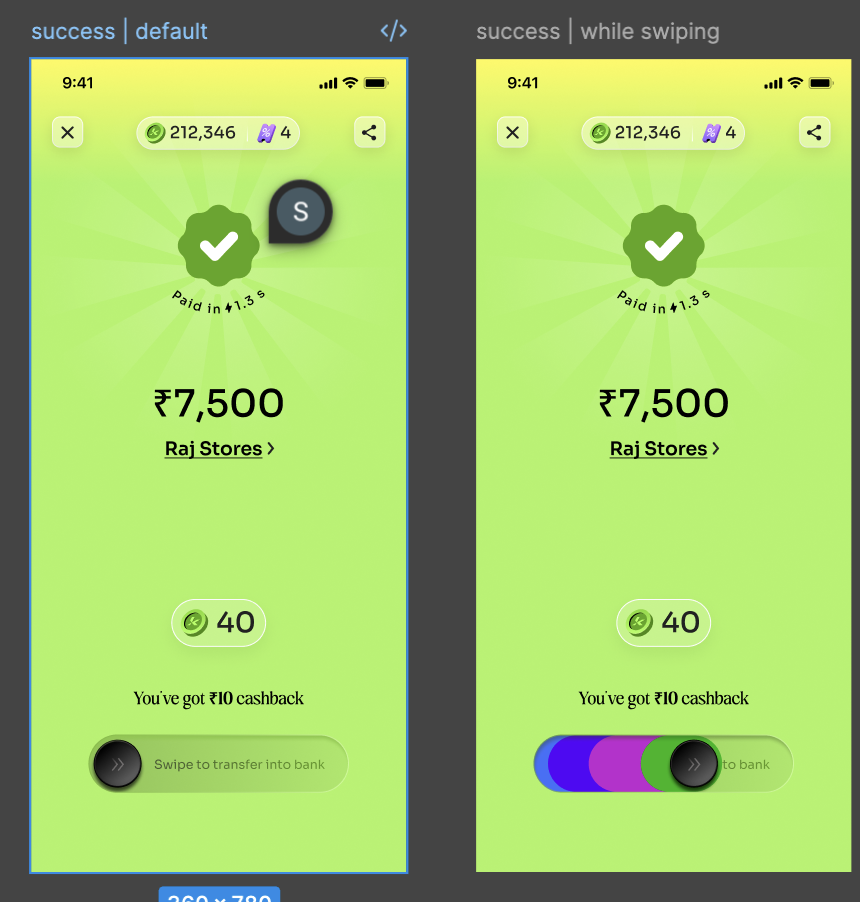
Every transaction starts the same way: a processing state with the user's avatar at center, green rays shooting outward, "Do not close the screen." When the payment confirms, the screen floods with KIWI green. The checkmark resolves. Amount and recipient appear, then the top bar slides in with coin count and voucher tally. The reward sequence starts - each reward animates in as its own pill before the Pinata takes the stage.
One file. Every design decision inside it.
The entire transaction success system lives in a single Rive file. Every decision in it is a design decision. The easing on the success burst, the frame where coins scatter, the timing of each reward pill entry, the greyscale transition when a Pinata expires - all authored in Rive, no app code written.
The file covers six entry points, an interactive reward sequence with three tiers, four UI components with their own internal state logic, and both loading and success phases for every transaction type. When product reviewed the combinations, they reviewed the actual file. What shipped was the file.
Every combination, pre-built in Rive
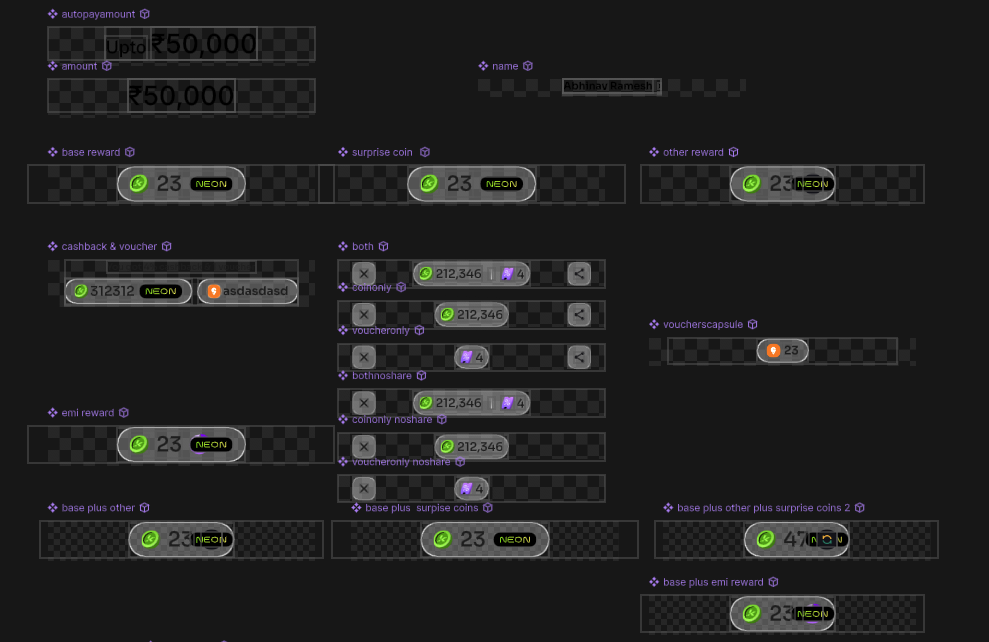
The artboard isn't one screen - it's a library of every possible reward state the backend can trigger. Each variant below is a live Rive artboard: reward pills with real coin counts, merged combination states, voucher capsules, share affordances.
Everything you see is data-bound. Amounts, recipient names, merchant names - runtime strings from the backend. The merchant logo, gift card brand color, coin asset - all swappable at runtime, no file changes needed. Component visibility, click interactions, whether the share button shows, whether the Pinata appears at all - engineering controls all of it through named inputs set the moment payment confirms. Design built every possible state. The backend picks which one runs.
Named inputs. Total runtime control.
Every variable below is a named input that engineering sets once, when the payment confirms. Rive reads them and routes the state machine - no app rebuild, no new file. The reward type, coin count, merchant image, share button visibility, click interactions - all runtime decisions. Design defined every state. The backend decides what the user sees.
One ENUM. Six widget states.
The pill at the top of the success screen - showing coin count, voucher count, and the share button - is controlled by a single ENUM on the main artboard. The backend reads the user's reward history and transaction context, then passes one of six enum values. No layout changes, no new artboard. The widget handles the rest.
Two other values in the same data panel are also dynamic: paidtext - the payment speed shown as "Paid in ⚡1.3s" - is a string set per-transaction from payment metadata. crosssellingdue is a separate ENUM driving the cross-sell component state.
name, amount, brandname, reward, cbvalue, showchar and more. Center artboard: the full TSS animation responding to those values in real time. Right panel: all reward state combinations at a glance. Change any input, the animation updates. This is what product and engineering review before any app code is written.
One entry. Every path.
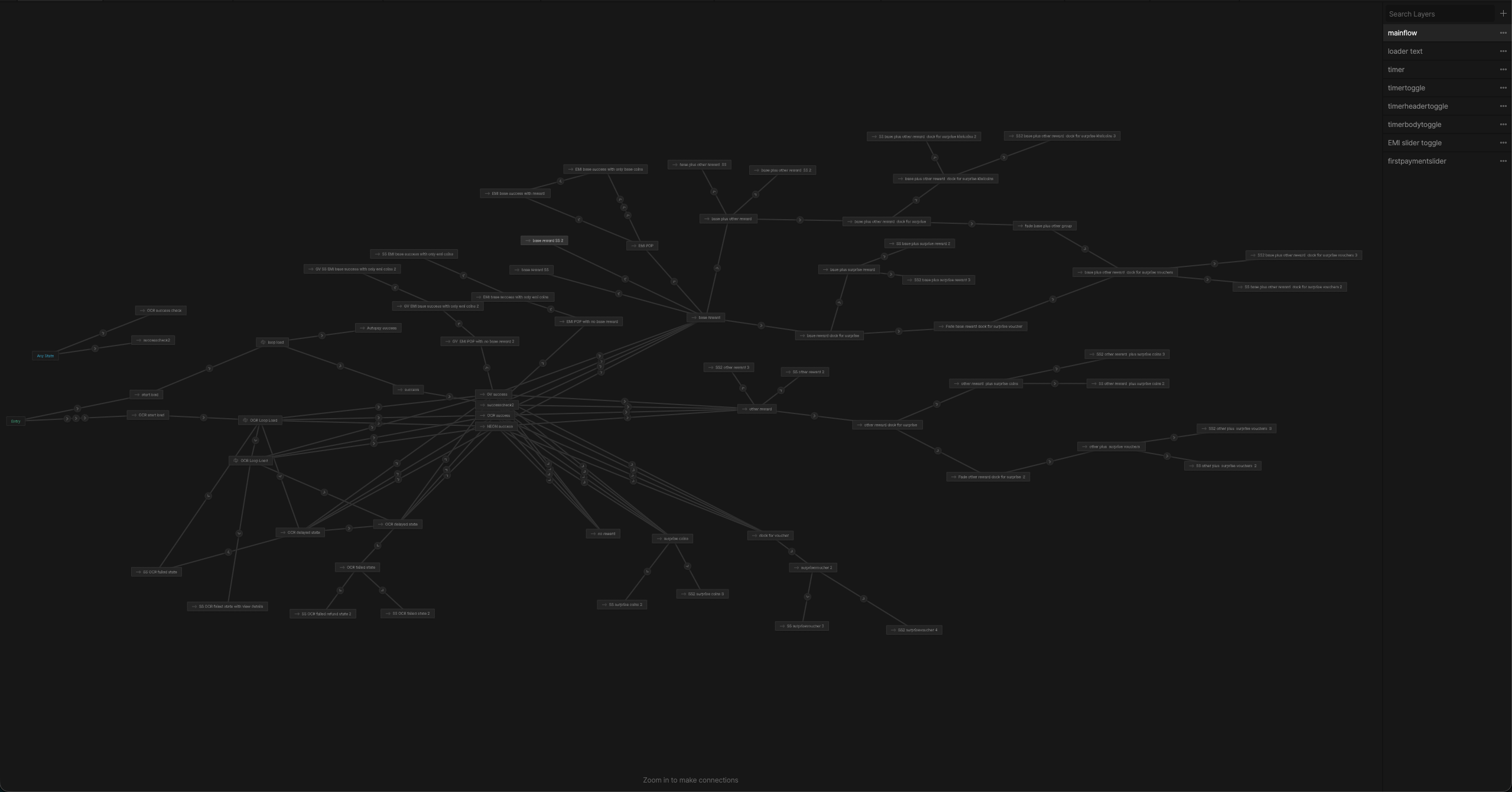
The mainflow state machine is the brain of the file. One entry node fans out into every reward combination, every entry point variant, slider states, expiry paths - all of it. The backend sets the inputs. The state machine branches, sequences, and fires events back to the app when interactions complete. The app doesn't choreograph the animation. Rive does.
Five sub-machines run alongside mainflow: the countdown timer, show/hide toggles, the EMI slider, and the first-payment slider. Each has its own inputs and event surface. The app listens for named events - it doesn't need to know what's happening inside.
Three types. One sequence. Strict order.
The reward sequence isn't random. Three types can appear in any combination - Base, Other, Surprise - but they always enter in the same order. When more than one triggers, each animates in as its own pill. Adjacent pills then collide and merge into one combined count before the Pinata takes the stage.
The Pinata character and reveal are backend-driven. Rive reads two integers: character (1, 2, or 3 for Tomato, Strawberry, Pineapple) and reward type (1 for coins, 2 for vouchers). Switch between any combination without touching the file.
If the user isn't eligible for any reward, the screen handles it cleanly - the success burst fires, the amount and recipient confirm, and the screen exits with no reward UI at all. Same state machine, no separate screen.
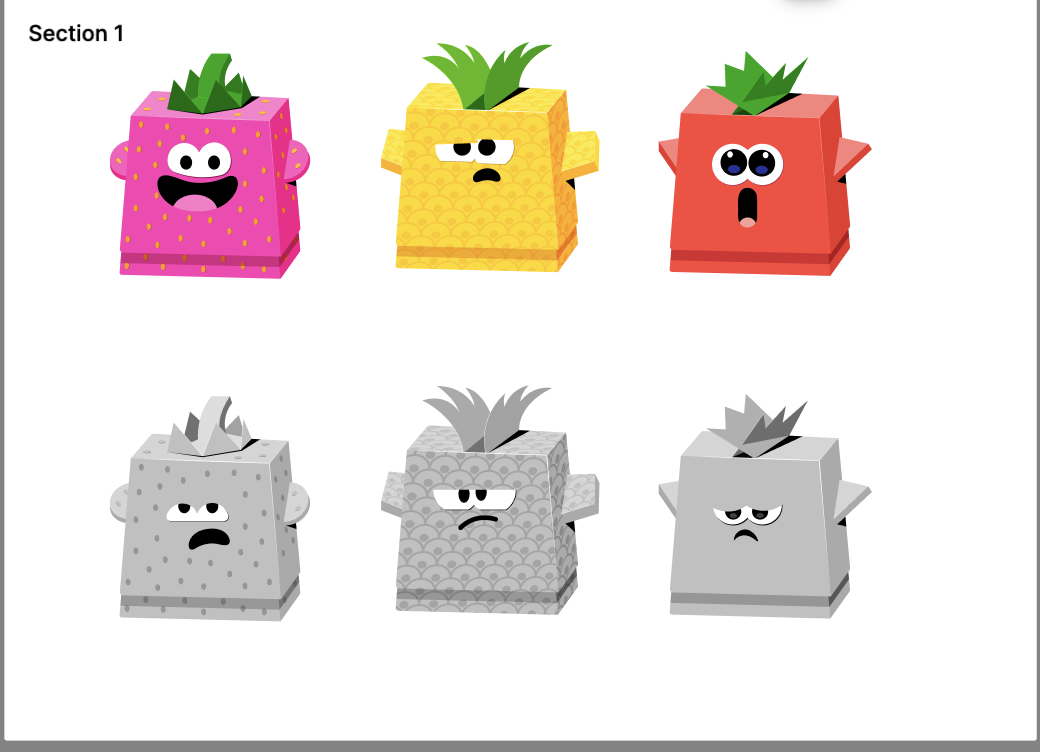
all states
active + expired
All three Pinata characters playing live in the Rive runtime. One integer - showchar - injected by the backend at payment confirmation switches the entire character. The idle bounce, the burst animation, the "Tap to open" tooltip, the countdown timer - all shared state machine logic. Nothing duplicated, nothing rebuilt. Let the countdown expire and every character shifts to greyscale. Same trigger, same transition, all three.
in → midsound → midloop, branching to either burst (user taps) or deactivate (30-second timeout). This nested state machine lives inside the character component - mainflow triggers it from outside. Which character appears is determined by showchar; the flow it runs is identical for all three.
Sliders for every state
Three slider components live in the same Rive file, each with a different interaction model. The EMI slider is purely state-driven - backend triggers, no user input. The other two are interactive: a swipe fires an event back to the app, or the first-payment trail leaves a gradient as the user slides through.
Non-interactive. Backend-driven state transitions: Loading → In Progress → Activated. The dark pill resolves the EMI confirmation without user input.
Interactive opt-in. Slide right to subscribe to a 24-hour EMI eligibility notification. The pill flips on completion: "You will be notified in 24 hours."
Interactive milestone. The gradient trail (purple to pink to green) fires a completion event; the backend redirects the user to their first reward claim screen.
A processing state inside a processing state
Credit card and gift card payments involve multiple network calls in sequence - the payment debit and voucher purchase run on separate rails. While the user waits, a dedicated loader shows both operations at once, each with its own status: one step resolves while the next is still spinning.
The whole component is data-driven. Step headings and body lines - "Payment initiated", "Voucher purchase in progress", "Refund initiated" - are runtime strings the backend sends. State transitions fire through four triggers: trigcompdelay, trigcomprefund, trigcompfailed, trigcompsuccess. One extra detail: giftcardcolor is a runtime hex value - the brand color of the gift card merchant, injected at payment time to tint the UI.
Same file. Different story each time.
Every transaction type KIWI processes enters the same Rive file: UPI transfers, credit card payments, Neon subscription activations, autopay setups, recharges, gift card purchases. Each has its own loading animation and success screen layout, but all branch from the same state machine. Two entry points are distinct enough to live as their own Rive pages inside the file.
The branded card is the hero - brand color injected via giftcardcolor at runtime. Voucher code and ID with copy affordances. WhatsApp delivery confirmation. No transaction amount; the card speaks for itself.
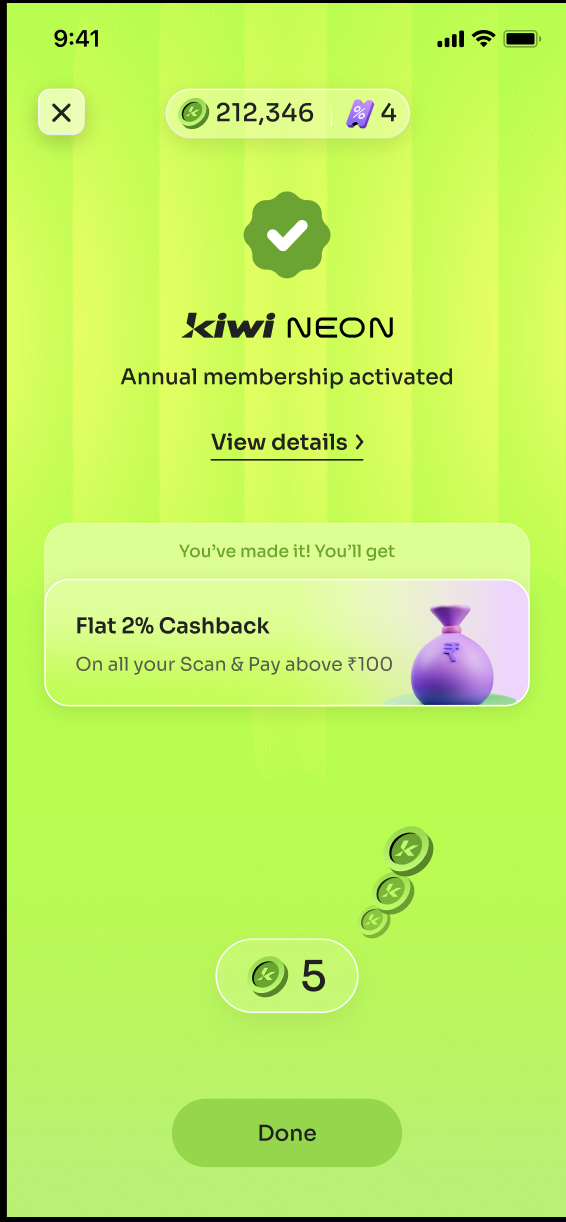
Vertical stripe background, KIWI NEON badge, "Annual membership activated" - a distinct visual register that marks a subscription apart from a payment. Same green success flip, completely different screen.
Cross-sell cards, configurable by the backend.
After the success burst, the screen can enter a summary state - a scrollable row of cross-sell cards. The number of cards is a runtime variable: the layout adapts from one card to several with no design change. Cards scroll horizontally within the same screen, so the user stays in context after paying.
Sound is built into the system, not patched in after. Multiple audio assets live inside the same .riv file, triggered by the same state machine events that drive the visuals. Engineering doesn't wire audio separately - it comes with the file.
Design shipped. Exactly as designed.
Three months from first state machine to production rollout - Rive design, developer integration, testing across all six entry points, live deployment. PMs, product designers, visual designers, and motion designers all worked from the same file throughout.
The biggest shift was ownership. Micro-interactions, animation timing, pixel-perfect states across every reward combination - design authored all of it in Rive. No spec to interpret. What the team approved in the file is what users got. That's a different kind of confidence.